| 1. Visit the PayPal website at
http://www.paypal.com |
| 2. Login to PayPal |
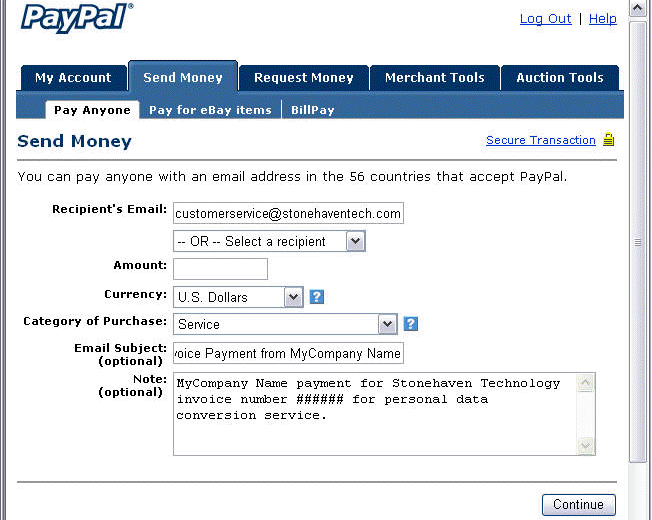
| 3. Select the Send Money tab. Select the Pay Anyone
sub tab. You will be taken to PayPal's Send Money
screen. |
| 4. Enter customerservice @ stonehaventech.com as the Recipient's
email |
| 5. Fill in the balance of the fields. Please use enough
information so that
Stonehaven Technology is able
to credit your account and invoice with this payment. |
|
 |
| 6. Click the Continue Button. You will now be taken to
the Check Payment Details screen. |
| 7. Confirm the payment and recipient information is correct.
Click the Send Money button. |
| 8. Follow the on-screen instructions for completing the
transaction. |
| You will receive an email confirmation and receipt for your payment
to Stonehaven Technology. |
